






Learning is often described as a journey. With that in mind, formative assessments can be thought of as a compass that provides a sense of direction. By assessing students during instruction, educators can identify where students are along the path, make course adjustments as needed, and continue guiding learning forward with purpose.
Graphic organizers and templates facilitate this process by organizing student responses in ways educators can quickly interpret and act on. Let’s explore some of the most common formative assessment templates and how they support different types of understanding.
What is a formative assessment?
Formative assessments are tools used during instruction to check for understanding and inform the next steps in teaching and learning. Unlike summative assessments, which evaluate learning at the end of a unit or term, formative assessments are used while students are still learning.
Formative assessments refer to the tools themselves, while formatively assessing describes how teachers use that information in practice. When teachers formatively assess a class, they actively analyze evidence of student thinking to understand what students know and where they may need additional help. While there are different types of formative assessments, they are typically brief and informal, so educators can quickly gauge where students are and adjust instruction to best address their needs.
Is a graphic organizer a formative assessment?
While graphic organizers can be used as formative assessments, they are a separate educational tool that helps students organize ideas and thinking. There are many different types of graphic organizers, such as charts, diagrams, and webs, but each provides a visual structure to arrange concepts, relationships, or sequences. Graphic organizers strengthen comprehension by breaking down complex information so that it is easier to understand.
Because students use graphic organizers to process their thinking, educators can gain valuable insight into what students understand and where they may need additional help. This makes graphic organizers an effective tool that supports formative assessments when teachers use the information gathered during learning to shape the next instructional steps.
Using templates and graphic organizers for formative assessment
Templates are pre-designed documents or layouts that, in education, use a structured format to guide student thinking and responses. Graphic organizers are often considered a type of template, and both can be used as tools to support formative assessments. Their structured format helps students focus their energy on showing what they know, rather than feeling unsure about what the task is asking or how to organize their response. When used consistently, these tools also build familiarity, so students know what to expect.
When responses follow a consistent structure, teachers can quickly scan for patterns and misconceptions, gaining a clearer picture of student progress to inform more targeted instruction.
How to choose the right template or graphic organizer
With so many options available, it can be difficult to choose the right formative assessment graphic organizer or template. A helpful starting point is to clarify the purpose of the formative assessment. For example, if the goal is a quick check for understanding, templates like exit slips, short reflection prompts, or single-question organizers work well. To assess deeper thinking, graphic organizers like concept maps, comparison charts, or sequence charts may be a better fit.
It’s also important to consider the subject area and the type of thinking you want students to demonstrate. For example, story maps and timelines strengthen understanding in literacy and social studies, while models such as part-part-whole diagrams and pie models are useful in math. The best templates will align with the learning goal and make it easy for students to clearly show their thinking.
10 types of formative assessment templates
The following graphic organizer templates can be used as formative assessments. These tools are flexible across subjects and grade levels, providing educators with quick, consistent ways to assess student learning during instruction.
1. Checks for understanding
Check for understanding strategies are used during or at key points in a lesson to gauge what students understand in the moment. They are quick and provide immediate insight into where students are in their understanding of the content.
- Red/yellow/green stoplight: A color-coded system that students can use to show their understanding: red = not understanding, yellow = partial understanding, green = confident
- Thumbs up/thumbs down: A hand gesture where students signal their level of understanding: thumbs up for understanding, thumbs down for confusion
- “I can” checklist: A list of learning goals that students write as “I can...” statements, then check them off to track their progress
- One-minute response: A short, written response of 1–3 sentences that shows what a student knows and what they still need to learn
2. Discussion-based checks
Discussions offer great insight into what students are thinking and what they still need help with. Teachers can gather this information by circulating and listening to student conversations, inviting students to share their thinking with the class, or reviewing the templates students complete during or after discussion.
- Turn-and-talk: A partner-based discussion routine where students respond to a prompt and explain their thinking with a partner
- Think-pair-share: A three-part discussion routine with these steps: think independently, discuss with a partner, share with the whole class
3. Exit tickets and written responses
These short, written responses and exit tickets are used at the end of a lesson to show what students learned, what they have questions about, and if additional help is needed. They give educators timely insights to help plan follow-up instruction.
- Exit ticket: A short, written prompt or question, also known as an exit slip, that is collected at the end of a lesson to assess student understanding
- 3-2-1 exit ticket: A type of exit ticket where students write three things learned, two questions, and one key takeaway after a lesson
4. Concept building and idea generation
When introducing a new topic or question, these strategies help students develop, explore, or organize ideas. They reveal students’ initial ideas, prior knowledge, and misconceptions, helping educators shape instruction and next steps. For example, if a teacher notices a gap in a KWL chart, they can adjust upcoming instruction to address it before the lesson or unit ends.
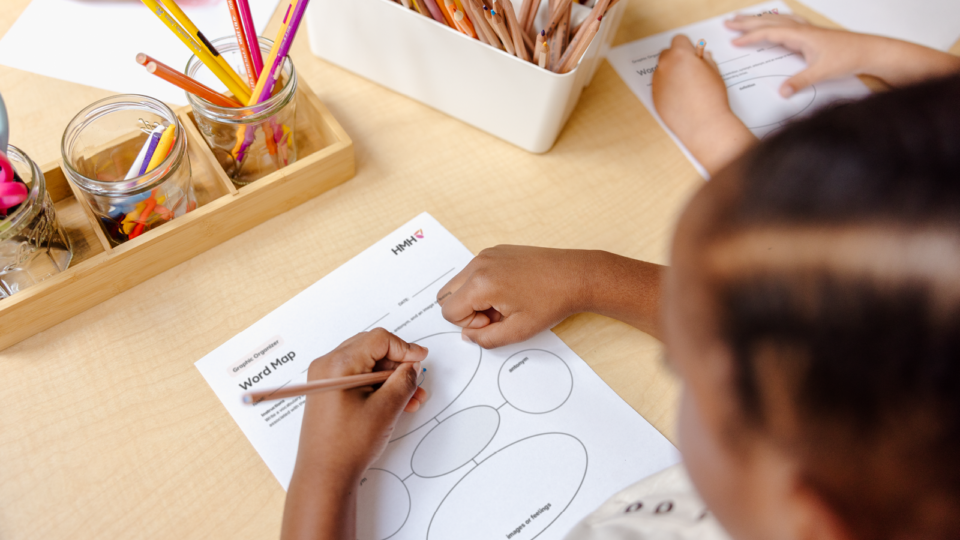
- Word map: A visual organizer with labeled sections for definitions, synonyms, antonyms, and images
- Frayer square chart: A vocabulary chart with sections for definition, facts/characteristics, examples, and non-examples
- Spider map: A spider-shaped graphic organizer that places the main topic at the center with branching legs that connect related ideas
- Idea wheel: A circular graphic organizer with four quadrants that can be labeled and used to organize ideas
- Describing wheel: A circular graphic organizer that has a central topic and surrounding sections to write related words or ideas
5. Relationships and analysis
These graphic organizers are used during or after instruction to help students examine how ideas connect and compare elements. They provide insight into how well students can explain relationships and justify reasoning. For example, if key similarities are missing or ideas are incorrectly placed in a Venn diagram, teachers can plan to revisit those ideas or concepts before moving forward.
- T-chart: A two-column chart that is used to sort information into two categories, for example pros and cons or facts and opinions
- Venn diagram: A diagram with overlapping circles that highlights similarities and differences between concepts
- Fact and opinion: A two-column chart that organizes factual and opinion statements
- Problem-solution chart: A two-column chart where students can list possible problems and possible solutions
- Fishbone planner: A fishbone-style organizer that has a central topic at the top with advantages branching to one side and disadvantages to the other
- Controversial issue organizer: A two-column chart that explores supporting arguments and counterarguments on a position
6. Process and sequencing
Focused on order and progression, these strategies use formats like timelines, flowcharts, and step-by-step prompts to help students understand the order, steps, or flow of a process or event. By examining how students sequence events or procedures, teachers can determine whether students are ready to analyze cause-and-effect relationships or apply the sequence in a new context.
- Sequence chart: A chart that lists steps or events that are arranged chronologically
- Timeline: A linear format that places events in chronological order
- Flow chart: A visual chart using boxes and arrows to list steps or events in a process
7. Reading and text understanding
Reading and text understanding strategies help students make sense of what they read by identifying key ideas and clarifying meaning. They are used during or after reading and provide evidence of how well students are interpreting, analyzing, and engaging with a text. For example, how students respond to the five W’s can help teachers decide whether instruction should focus on comprehension or deeper inference.
- Five W’s chart: A set of prompts that ask: What happened? Who was there? Why did it happen? When did it happen? Where did it happen?
- Story map: A structured organizer that typically includes sections for plot/events, characters, and settings
- Concept/event map: A connected diagram that organizes important ideas and events from a text
8. Reasoning, writing, and explanation
These graphic organizers help students clearly express ideas and their reasoning. They provide insight into how well students can articulate ideas, support claims with evidence, and communicate their thinking clearly, which teachers can use to guide the next instructional steps.
- Sandwich: A sandwich organizer that helps students structure writing with a topic sentence as the top slice of bread, supporting details as the filling, and a concluding sentence as the bottom slice of bread
- Three-column organizer: A three-column chart that helps students sort and compare ideas by organizing them across three labeled categories
- Problem-solving frame: A graphic organizer that breaks down the problem-solving process and guides students through each stage of their work
- RACE organizer: A graphic organizer that prompts students to: restate the question (R), answer the question (A), cite evidence to support the answer (C), and explain the answer (E)
- Persuasion map: A planning organizer that lays out a goal alongside supporting reasons and facts/examples to build an argument
- Goal-reasons web: A diagram that connects a central claim to supporting reasons, helping strengthen an argument
9. Math and concepts models
These mathematical models help students represent and explore mathematical ideas using visuals, symbols, manipulatives, or diagrams. They are typically used during instruction and help educators determine whether students are ready to move from concrete or visual models to more abstract representations or to apply the concept in increasingly complex problems.
- Part-part-whole diagram: A diagram that shows how individual parts combine to form a whole
- Pie model: A circular visual divided into segments to compare amounts within a whole
10. General charts and data organization
General charts and data organizers help students arrange information, identify patterns, and compare ideas, texts, or data sets. By reviewing how students sort and connect information, teachers can decide whether to provide additional structure or introduce more complex concepts.
- Observation chart: A table with labeled rows or columns used to record observations during an activity
- Sense chart: A five-senses chart with labeled columns for recording what students see, hear, smell, touch, and taste as applicable
- Four-column chart: A chart divided into four columns used to sort and compare information
- Tree chart: A tree-inspired diagram that organizes ideas hierarchically, with the main idea on the trunk and supporting ideas branching outward
- ISP chart: A three-column chart with sections for information (I), source (S), and page (P)
Share your formative assessment ideas
Formative assessment templates and graphic organizers offer practical ways to make learning visible during instruction. When used responsively, these tools lead to timely instructional adjustments and a more responsive classroom experience for all learners.
Are we missing any essential graphic organizers or templates for formative assessment? Share them with us via email at shaped@hmhco.com..
***
Check out our full list of free graphic organizer templates.
Turn data into timely, targeted instruction for every student.